E.02 · Código abiertoOpen sourceAgujero negroBlack hole
a = −(3/2)·r_s·h²·r / r⁵
Un agujero negro con su disco de acreción, calculado rayo por rayo en la GPU: la luz se curva y el disco aparece por encima y por debajo de la sombra.A black hole and its accretion disk, computed ray by ray on the GPU: light bends and the disk shows up above and below the shadow.
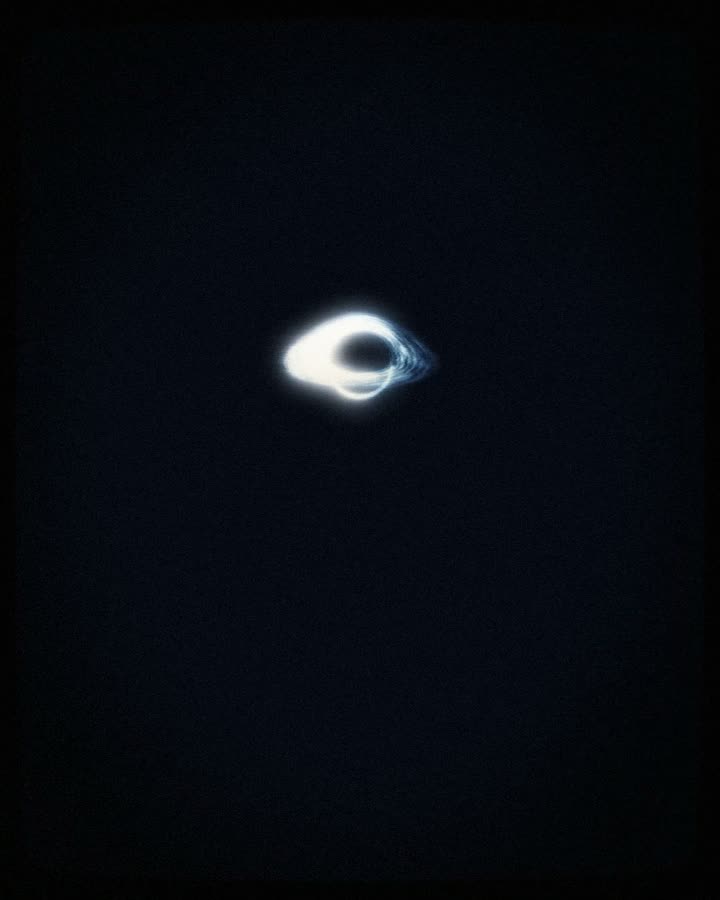 Escena del teaserScene from the teaser
// 01La cienciaThe science
La gravedad de un agujero negro es tan intensa que curva la trayectoria de la luz. Por eso el disco de gas que gira a su alrededor, aunque es plano, se ve también por encima y por debajo de la sombra: es la luz de la parte de atrás del disco, desviada hacia nosotros.
El gas del disco gira a velocidades cercanas a la de la luz. El lado que viene hacia la cámara se ve más brillante y azulado, y el que se aleja, más tenue: es el efecto Doppler relativista. Cerca del horizonte, además, la luz pierde energía al salir del pozo gravitatorio.
A black hole’s gravity is so strong that it bends the path of light. That is why the gas disk spinning around it, even though it is flat, also appears above and below the shadow: it is light from the far side of the disk, bent towards us.
The gas in the disk moves close to the speed of light. The side coming towards the camera looks brighter and bluer, the side moving away dimmer: the relativistic Doppler effect. Near the horizon, light also loses energy climbing out of the gravitational well.
// 02Cómo se calculaHow it is computed
- Por cada píxel sale un rayo desde la cámara, con raymarching en un shader WebGL2 y cuatro muestras por píxel para suavizar los bordes.
- En cada paso el rayo se acelera hacia el centro con
a = −(3/2)·r_s·h²·r / r⁵, una aproximación de la geodésica de Schwarzschild dondehes el momento angular del rayo. El paso se achica cerca del horizonte y el rayo avanza hasta 300 pasos. - Si el rayo cae dentro del radio de Schwarzschild
r_s, ese píxel queda negro: es la sombra. - Cuando el rayo cruza el plano del disco se calcula su luz: temperatura según el radio, filamentos de turbulencia con ruido fbm que giran a velocidad kepleriana, y el factor Doppler
g = 1 / (γ(1 − β·cos θ))junto al corrimiento gravitacional. La intensidad crece conD⁴. - Al final, tonemapping ACES y corrección gamma. En el teaser entra con el primer drop y después la cámara baja al pozo del espacio-tiempo, el paraboloide de Flamm.
- One ray per pixel leaves the camera, raymarched in a WebGL2 shader with four samples per pixel to smooth the edges.
- At every step the ray accelerates towards the center with
a = −(3/2)·r_s·h²·r / r⁵, an approximation of the Schwarzschild geodesic wherehis the ray’s angular momentum. The step shrinks near the horizon and the ray advances up to 300 steps. - If the ray falls inside the Schwarzschild radius
r_s, that pixel stays black: that is the shadow. - When the ray crosses the disk plane its light is computed: temperature by radius, turbulent filaments from fbm noise spinning at Keplerian speed, and the Doppler factor
g = 1 / (γ(1 − β·cos θ))together with gravitational redshift. Intensity grows withD⁴. - Finally, ACES tonemapping and gamma. In the teaser it enters on the first drop, then the camera dives into the spacetime well, Flamm’s paraboloid.
// 03El códigoThe code
Este es el código que corre en el video, tal como está en el repositorio. Todo es función del tiempo: cualquier cuadro se puede calcular solo y sale igual.
This is the code that runs in the video, exactly as it is in the repository. Everything is a function of time: any frame can be computed on its own and comes out the same.
El shader: rayos curvados, sombra y disco con Doppler beaming.The shader: bent rays, shadow and a disk with Doppler beaming.
vec3 hoyo(vec2 frag) { vec2 uv = (frag - 0.5 * uRes) / (0.5 * uRes.y); vec3 rd = normalize(uCamRot * vec3(uv * uFov, 1.0)); vec3 p = uCamPos, v = rd; vec3 col = vec3(0.0); float trans = 1.0; float h2 = dot(cross(p, v), cross(p, v)); for (int i = 0; i < 300; i++) { float r = length(p); if (r < uRs) break; if (r > 30.0 && dot(p, v) > 0.0) break; float dt = clamp(0.06 * (r - uRs * 0.6), 0.004, 0.6); vec3 a = -1.5 * uRs * h2 * p / pow(r, 5.0); vec3 pn = p + v * dt + 0.5 * a * dt * dt; vec3 vn = normalize(v + a * dt); if (p.y * pn.y < 0.0) { float f = p.y / (p.y - pn.y); vec3 x = mix(p, pn, f); float rr = length(x.xz); if (rr > uDiscoIn && rr < uDiscoOut * uRevela) { float ang = atan(x.z, x.x); float w = sqrt(uRs * 0.5) / pow(rr, 1.5) * 1.6; float lr = log(rr); float a2 = ang - uTime * w * uHoyoGiro; float tur = fbm(vec3(lr * 16.0, cos(a2) * 2.6, sin(a2) * 2.6)); float fil = fbm(vec3(lr * 46.0 + tur * 2.0, cos(a2) * 6.0, sin(a2) * 6.0)); float dens = pow(sat(tur * 1.25), 2.2) * 1.6 + pow(sat(fil * 1.3 - 0.3), 3.0) * 1.4; float T = pow(uDiscoIn / rr, 0.75) * pow(max(0.0, 1.0 - sqrt(uDiscoIn / rr)), 0.25) * 2.2; vec3 vel = normalize(vec3(-x.z, 0.0, x.x)); float beta = sqrt(0.5 * uRs / max(rr - uRs, 0.01)) * 0.85; float gam = 1.0 / sqrt(1.0 - beta * beta); float g = 1.0 / (gam * (1.0 - beta * dot(vel, -v))); float grav = sqrt(max(0.0, 1.0 - uRs / rr)); float D = g * grav; float I = pow(T, 2.4) * pow(D, 4.0) * dens; vec3 c = colorDisco(sat(T * D * 0.75)); c = mix(c, c * vec3(1.35, 0.72, 0.42), sat((1.0 - D) * 1.8) * uHoyoCalor); float borde = smoothstep(uDiscoIn, uDiscoIn * 1.06, rr) * smoothstep(uDiscoOut * uRevela, uDiscoOut * uRevela * 0.45, rr); float alpha = sat(I * 1.5) * borde; col += trans * c * I * borde * 1.15 * uHoyoBrillo; trans *= 1.0 - alpha * 0.85; } } p = pn; v = vn; if (trans < 0.02) break; } return col;}// 04RecrearloRecreate it
Con Node 20 y Chrome alcanza para sacar los cuadros de esta escena. El video completo, con la canción y todas las simulaciones, se arma con los pasos del README.
Node 20 and Chrome are enough to render the frames of this scene. The full video, with the song and every simulation, is built with the steps in the README.
# 1 · clonar e instalar · clone and install
$ git clone https://github.com/4mser/bn-lectures-teaser.git
$ cd bn-lectures-teaser
$ npm ci
# 2 · cuadros sueltos de esta escena (16:9) · frames of this scene
$ node herramientas/cuadros.mjs out/agujero 900,960 ClaseYT
# 3 · o recorrerla en Remotion Studio · or scrub it in Remotion Studio
$ npm run dev